
A DAW with a built-in engineer
for macOS · Apple silicon

A brand new DAW.*
*Engineer included.
**Spider-Man is not.
Tell it how you want to sound. It measures every plugin on the way in and out, catches what you’d miss, and plays you the plan before anything changes, with your own plugins. One undo takes it all back.

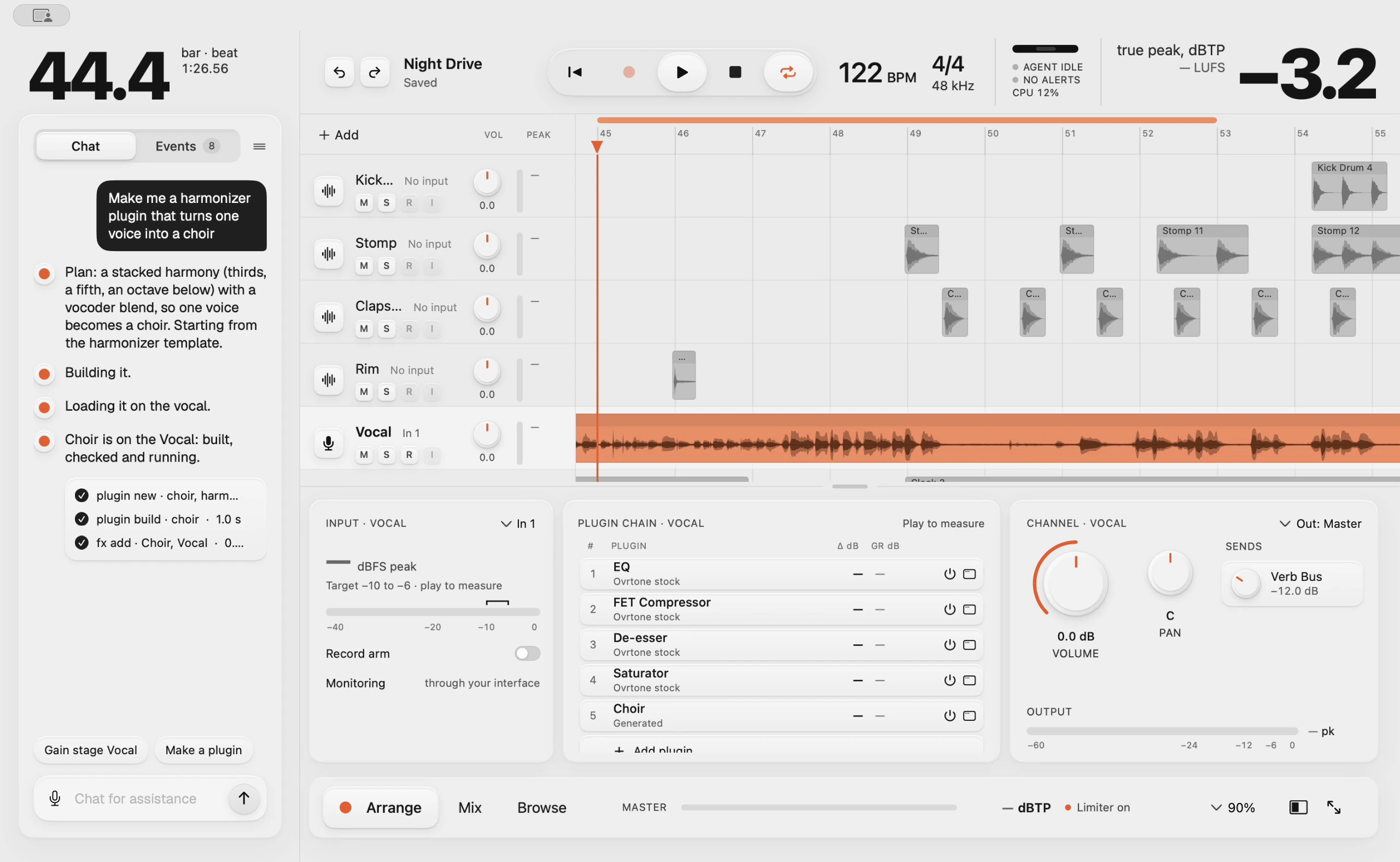


 — the first session
before ovrtone
Guessing
vs. measuring.
Ovrtone started with an AI mixing a vocal in another DAW by looking at screenshots. Two hours in, it had still missed five things. So we built a DAW it can measure.
-
By screenshots
Meters read −15, then −45, on the same audio.
Ovrtone’s engineerReads every plugin’s input and output as numbers.
-
By screenshots
An armed track played the live mic into the mix.
Ovrtone’s engineerWarns you when a track is passing live input.
-
By screenshots
One loud spike fooled Normalize, and the take came out too quiet.
Ovrtone’s engineerReads the singing and the spike separately.
-
By screenshots
Demo-mode plugins went unnoticed.
Ovrtone’s engineerFlags demo-mode plugins and swaps in stock ones.
-
By screenshots
The master clipped at +3.1 dB, with no alert.
Ovrtone’s engineerA safety limiter on the master, and a clipping alert.
It measures every plugin.
Before and after every plugin: level, loudness, true peak, and how hard each compressor is working. The engineer gain stages by those numbers, and you see the same ones.
It catches what you’d miss.
004- A mic left live
- A plugin that’s only a demo
- A clipping master
- One loud spike
- Harsh S’s
- A ringing resonance
It tells you when it finds one, and what it did about it.
You hear the plan first.
Bigger changes come as a plan. Play A, your mix as it is, and B, the engineer’s version, at the same loudness, so louder can’t fool you. Then apply it, or don’t. Every change is one undo step.
How a session goes
five steps · one take · no manual-
01
Record
Plug in, hit record, sing. A raw take, nothing on it yet.
-
02
Ask
In the chat: “make my vocal warm, close and a little dark, with a big wet reverb.”
-
03
It builds
The engineer picks from your own plugins, sets each one and gets the levels right by measuring every plugin, not guessing. You watch it happen in your mixer.
-
04
Play back
Hear it before it’s applied. A/B the before and after, then apply. One undo takes it all back.
-
05
Ask for a plugin†
Don’t have the plugin? Ask. “Make me a harmonizer that turns one voice into a choir.” It writes it, builds it and drops it into your chain.
it works to
Measured
throughout
- your vocal going in
- −10 to −6 dBFS
- how hard the compressors work
- FET 3–5 dB · Opto 2–3 dB
- each plugin, out against in
- ± 1 dB
- your master
- ≤ −1 dBTP · safety limiter on
- every change it makes
- One undo step · big ones planned first
“Make me a harmonizer plugin that turns one voice into a choir.”
Don’t own the plugin? Describe it. The engineer writes it, builds it, checks that it works, puts it in your chain and sets it up. Then you play. That’s the conversation in the window at the top of this page.
Plugin building comes with Pro, Studio and the license.
It learns your taste.
Ask for chords and it offers three, from safe to unexpected. You pick; it learns what you like, whichever AI is behind it. You still write the song.
The rules
six, non-negotiableYour music stays yours
Your projects, recordings and plugins stay on your Mac, in your project folder. Nothing is locked in our cloud.
If you can do it, it can do it
The engineer uses the same controls you do, and you can see everything it did.
It measures
Before and after every plugin: level, loudness, true peak, how hard a compressor is working. Never a screenshot.
Bring your own AI
Use our engineer on a plan, or your own AI with the license: Claude Code, an Anthropic or Moonshot key, any OpenAI-compatible service, or any AI agent that speaks MCP.
You stay in charge
Bigger changes come as a plan: you can hear it first and A/B it at matched loudness. Every change is one undo step. Big volume jumps are capped and a safety limiter keeps the master from clipping. It asks before destructive steps, such as removing a track or a plugin.
Your plugins, your sound
It works with the AU and VST3 plugins you already own, knows what their controls do, and tells you when one looks like a demo.
— for developersevery action is a command
For developers: every action is a command.
Everything in the window is also a command, so the engineer can do anything you can, and you can see exactly what it did. Every change is one undo step. AI agents can drive a session over MCP.